Home » Dr. Jayne » Recent Articles:

Curbside Consult with Dr. Jayne 9/30/13

September 30, 2013 Dr. Jayne 2 Comments

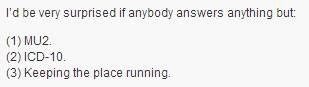
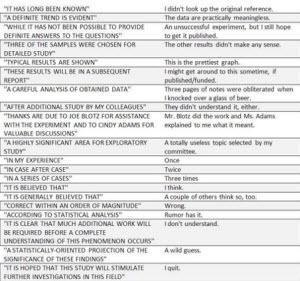
Being an anonymous blogger can be very isolating, which is why I think I enjoy following other anonymous bloggers. One of my favorite, Skeptical Scalpel, recently penned a satire about a website where clinicians could rate their patients. Most of my colleagues are less than thrilled about websites where patients can rate physicians. Some have faced negative reviews for patient outcomes that were beyond the physician’s control. Others have been criticized for inability to meet unrealistic patient expectations.

Although it will never happen, the idea of being able to rate our patients is an interesting one. I’m not talking about gathering data for cherry-picking the healthiest patients or dropping those that are the sickest. I’m talking about using data based on previous patient-physician experiences that could better inform how we care for patients. As a PCP, I would occasionally have patients come to my practice because they had been fired from a previous physician for missing appointments. I didn’t have enough staffing or funding to do close follow up on all my patients, but I could immediately assign this patient to a variety of reminders and services to make sure he or she makes it to scheduled appointments as soon as he or she joins the practice rather than waiting for enough missed appointments to see a pattern.

The proponents of patient engagement don’t talk a lot about this, but patients are sometimes inaccurate about their histories and behaviors. It’s simple human nature – we all want to be doing a better job with our health than we might actually be doing, which often leads people to under-report their alcohol consumption or over-report their exercise behaviors.

There are a fair number of diligent and dedicated patients that are as honest as they need to be. Their ranks may grow as records become more transparent and more portable. I don’t know any patient though who comes in and says, “I miss one out of every three appointments I schedule.” That kind of data isn’t anything that mainstream practices are currently sharing with HIEs or CCD exchange.

These non-medical health factors are a huge deal when you’re trying to function as a patient-centered medical home or accountable care organization. Often there is not a good way to figure it out unless the previous caregivers documented that level of detail in the chart. Sometimes when records are transferred, those items are specifically left out because they may fall under behavioral health, which in many states requires a special authorization for release. Rarely does the patient volunteer those details during the initial visit.

I’m a big fan of patients bringing in their data, but only if it’s honest and valid. Technology is a great help with this. Having a patient bring in an exercise log from Garmin Connect is pretty solid because unless they’re strapping the GPS unit to their dog and letting it run the neighborhood, it’s not easy to fake. On the other hand, when patients bring in their handwritten log that shows they’ve walked 60 minutes a day every day for the month and have been compliant with their diet yet have gained 10 pounds for no medically explainable reason, it’s likely that the fudge factor was involved in logging the data.

As an added bonus, being able to rate patients would also provide an opportunity for something that is becoming more and more lacking – physician engagement. I am working with an increasing number of physicians who are burned out, apathetic, and considering other careers. Many practices can’t afford to have health coaches and care coordinators. It’s a Catch-22 where you have to provide the care to get the incentives, but you can’t afford to provide the care without having the incentive payments. Because of that, many physicians take on the work themselves.

You can easily run the return on investment numbers and show them that if they could see two more patients a day (which they could easily do if they delegated more work) they could afford another staffer. Most independent physicians aren’t willing to take the interim pay cut while a new staffer gets up to speed and they can get to the point where they can add those two visits a day. Employed physicians are often locked in to arbitrary staffing numbers their health system forces them to meet regardless of case mix or panel size.

For even the most burned out and disgruntled among us though, I bet I could get them to participate in a patient rating site. If not a patient rating site, there could be other ways of actually gathering objective data about real vs. reported patient behaviors. What do you think? Email me.

Print

E-mail Dr. Jayne.

Curbside Consult with Dr. Jayne 9/23/13

September 23, 2013 Dr. Jayne Comments Off on Curbside Consult with Dr. Jayne 9/23/13

clip_image002

I spent most of this week conducting a site visit at a primary care practice that subscribed to our affiliated physician EHR offering last year. When they decided to take the bait on my hospital’s hook (as well as the accompanying subsidy) they were on an ambulatory system from another vendor. They had a contractor perform a partial conversion of their clinical data (“partial” due to cost) but my team was told to officially stay out of the conversion due to concerns with the subsidy agreement, data ownership, liability, and other contract-related issues. It was instead approved by the practice’s clinical champion. Since they are on their own instance of the application and their data doesn’t commingle with mine, I had no reason to push back or demand involvement.

When they migrated to our platform, our team conducted their training in the same manner with which we have trained hundreds of other physicians. Since they are affiliated and not employed (and also because they are located several hundred miles from our corporate mother ship) I hadn’t been out to visit them. Their leadership complained to our CIO that they were struggling with the system and requested that we send someone out to “fix it.” The practice is in a prime location for some fun outdoor activities, so I decided to conduct the site visit myself. After some preliminary discussion with practice leadership to obtain some background information and specifics on their concerns, I was on my way.

Performing a site visit like this is not for the faint of heart. As part of an employed medical group, we have people who are constantly after us to make sure we are compliant with OSHA, CLIA, HIPAA, and a host of other acronyms. Many small practices struggle in keeping up with these basics, not to mention with the multiple regulatory requirements that keep popping up like dandelions in spring. I always remind our process improvement team that it is important to clearly define the areas of observation and the questions to be answered before you start the site visit. Otherwise, it is possible to be overwhelmed with findings that may be outside the project parameters. Many of us have been confronted with findings that although out of scope, are so critical that they must be immediately addressed and sometimes the site visit comes to a screeching halt because of it.

I’ve had providers scream at me about unrelated issues, have had providers cry while I try to interview them, and have had them complain about their spouses making them late to the office which interferes with the schedule. There have been those that argued, others that pleaded, and some that stood up and walked away when we presented our findings. We try to stay objective and professional even when we see things that make our skin crawl.

With those experiences under our belt, sometimes we numb ourselves to the things we see because we’re there to assess people, process, and technology, not how providers are practicing or how diligent the housekeeping staff might be. In my role, I’m not there to address the fact that you just performed what you thought was a diabetic foot exam but what I thought would have earned one of my interns a trip to physical diagnosis remediation class. However, if I see you wearing a dirty lab coat with a Santa Claus pin on it in August, I’m probably going to say something whether it’s in scope or not. Luckily I didn’t run across anything like that on this visit, but what I did find was a group that is trying to perform the practice equivalent of running a marathon in high heels.

The practice has a great layout and plenty of space – it was built for six physicians but currently holds only four and all of them feel that they are equally busy. Their levels of productivity are similar except for a senior physician who no longer takes call but makes up for it with lower compensation. It’s nice to have that kind of a level playing field when you’re observing practice dynamics because when some partners are busier (or feel they are doing more of their share of the work) it’s usually a marker for dysfunctional team dynamics. They’ve had some staff turnover but not an unusual amount, and currently have two clinical support staff for each physician. Another good sign.

As part of our Meaningful Use preparation, we recently upgraded their EHR to the most current version available from our vendor and they received the same training our own physicians received. Unfortunately, the positive signs stopped there. Some of the first questions I ask when shadowing physicians involve how they feel the use of the EHR is going for them, and what their personal priorities are for use of the system. I also ask what they feel are the practice or health system’s priorities. Not only did all five of them have very different personal priorities, none of them could accurately identify the practice’s priorities. They could not identify a mission statement or a vision for how care is to be conducted in the office.

I wanted to assess how the recent upgrade impacted them and they admitted that they were not using many of the new features including some that streamlined workflow, reduced manual data entry, and others that provided clinical decision support. I felt bad that despite our educational efforts, they either failed to understand the clinical utility of the content or didn’t know how to incorporate the features into their existing work flow. In digging deeper though I found the root cause. The providers had made a deliberate choice not to use the new features. Instead, they decided that they needed to focus all their efforts on the many incentive programs available to them.

In addition to Meaningful Use, they are trying to obtain recognition as a Patient Centered Medical Home and are participating in a diabetes care collaborative. They are also participating in four different pay for performance plans that each have different metrics. Due to the disparity, they’re trying to focus on the key elements for each patient based on insurance rather than taking a population-based approach. In regards to Meaningful Use, they were not able to articulate which clinical quality measures they would be reporting or how they were performing on the MU measures overall. They haven’t run any preliminary Meaningful Use reports despite planning to attest soon. They have no idea where they stand.

Over the lunch hour, I decided to queue up some of their reports and I had some not so pleasant surprises. The first things I found were some pretty serious artifacts from their conversion. There were diagnoses such as “Verify: Gout” and “Verify: Diabetes” and “CONVERSION: DO NOT USE.” All of them had ICD-9 codes of 000.00 associated with them. I drilled down to a handful of patient charts and found that they also had multiple versions of similar diagnoses (250.00, 250.02 for example) that had not been reconciled. In addition to causing havoc with the reports, the patient diagnosis lists were messy and difficult to read with the conflicting codes present. It seems that they were supposed to clean up the diagnosis lists the first time the patient had a visit on the new EHR, but it didn’t get done. Unfortunately the providers have continued to select diagnoses of 000.00 from the patient diagnosis list which carries it forward and the coders have been fixing them on the practice management side, but no one closed the loop in the EHR.

Additionally, after a couple of months on the HER, they had stopped reconciling altogether. I had been thinking about how to create some payer-specific alerts for them for their pay for performance programs (assuming I couldn’t convince them to either care for all patients with the same standards regardless of payer or drop the incentive programs that created conflict) but without accurate codes to identify the disease states, it was going to be extremely difficult.

As much as they decided to mix it up with the pay for performance indicators, they took the opposite tack with Meaningful Use. Uncertain of the actual thresholds for some of the measures, they decided to go whole hog. Instead of reconciling medications at transitions of care, they were performing full reconciliation at each visit. Instead of summarizing tobacco use and updating any changes since the last visit, they were eliciting a complete tobacco use history even if it had already been documented. One patient actually complained about being asked the questions at every visit even though he had stopped smoking years ago. They are performing full vital signs on all patients (including infants) at every visit, regardless of the reason for visit or the time since they last presented to the office. They are trying to provide patient education for every visit, even when education may not be relevant. By the end of the first day, I was tired just watching them.

I observed each physician’s care team for several hours over a couple of days and also shadowed in the lab. Working with the billing and coding staff and the office manager, we identified additional areas for improvement. Typically at the end of a site visit I do a report-out with the providers and leadership. Most of the time I am recommending that they get moving and add MU activities to their processes. This time, though, I had to make recommendations for them to do less in some regards, which felt very strange as a recommendation. We had some good discussion and they really struggled with how to determine which things they should do for every patient and which they should do only when required.

I left them with a simple litmus test: actions should be performed at every visit only when they are clinically significant or are required by a regulatory body. We looked at the tobacco use item as an example. If the patient is not currently smoking, does it make sense to ask about their past use at every encounter? Probably not, as long as they are flagged as a never smoker or a former smoker. If the patient is currently smoking, does it make sense to ask about cessation at every visit? Yes, because all four P4P programs are looking for that element. I’ve asked them to go through their work processes and ask those kinds of questions for the various documentation elements. I’ve also asked them to start reconciling diagnoses on each visit to get those lists cleaned up before we head for ICD-10.

We’re going to set up monthly calls to check on their progress. I’ve given them some homework that is due before the first one. I’m hopeful that we can make their workflow more streamlined and less stressful while delivering quality care. They’re going to be working hard to get ready for their attestation period, but I’m cautiously optimistic. Hopefully I’ll be able to keep you posted on their progress.

For those of you who are curious about the picture, it’s Julia Plecher of Germany. She holds the Guinness World Record for the fastest 100 meters in high heels. Her time: 14.531 seconds. I wonder if Inga will be able to top that in her party hopping at MGMA? I can’t wait to find out.

E-mail Dr. Jayne.

Curbside Consult with Dr. Jayne 9/16/13

September 16, 2013 Dr. Jayne 1 Comment

I mentioned in last week’s EP Talk that I’m preparing to sit for the Clinical Informatics board exam next month. At the board review course I attended recently, there were several comments about the recommended reading list published by the American Board of Preventive Medicine. At some point during the last few months it grew from something like six books to a dozen, plus relevant journal articles. Luckily I came into the process a little on the later side, so the list has already been its current length. Being the compulsive over-preparer that I am, I had decided a couple of months ago to at least make the attempt to read all of them.

The first challenge was cost. Many of the books on the list are textbooks. Renting them, buying them used, or getting the Kindle editions would have been over $1,000. I hit my local library website and found that only one was available – John Kotter’s Leading Change. If you deal with IT implementations, project management, or anything related to healthcare or healthcare IT and haven’t read this book, you should add it to your list. It’s quick – only 200 pages – and explains some key elements of projects that involve change. His eight reasons that change efforts fail are often visible in projects I encounter, which continues to surprise me when no one seems to have made attempts to remediate them.

Although the overall cost was a concern, so was the cost of some of the individual texts. I didn’t want to get stuck with a bunch of expensive books that I’m not sure I would use again (even if they were electronic and wouldn’t be hanging out on my bookcase) so I decided to go old school with my studying. I’m a good 25 miles from my nearest academic medical library, so I decided to request them through my local public library. Allow me to just say that Inter-Library Loan is a thing of beauty. Before long, I had many happy emails telling me that books were ready. The first one came in from the University of Nebraska at Omaha and it soon became a little game to see where they would be coming from. Unfortunately their arrival was a little unpredictable, and receiving three thick texts at the same time was giving me unpleasant flashbacks of my first year of medical school.

The second challenge in reading some of the materials was their age. Some of the books on the list were written more than 15 years ago. I enjoyed taking a ride in the Wayback Machine while skimming through the chapters on how computers became part of the healthcare landscape and learning more about some of the foundational systems for clinical care. Except for when I was a Candy Striper, computers have always played a role in patient care during my career even if it was just a lab information system. It was fun to see the pictures of some of the early information systems as well as the sideburns that went with them.

Nearly all of them were written in a world before Meaningful Use. In some ways, that was a less complicated age, even if the tools were less sophisticated. Some of the texts are more targeted towards administrators or non-clinicians and it was interesting to see what people on the other side of the street think or know about what we do.

The third challenge was dealing with the fact that I had the readings in textbook format. It’s been a long time since I turned the pages of anything thicker than a good mystery novel. After a week or so of reading, I had a muscle spasm in my neck that didn’t do much for my concentration. One of my Australian colleagues had given me The Book Seat as a gift and I have to say it was a lifesaver for propping those 800-page books at an angle that made them easy to read. I also ran across one book about informatics in public health that was printed in a typeface that was blurry and distracting. I’m not sure if it was just the copy I had and since it was from the University of Ontario it wasn’t like I could just run out and get another copy, so I had to power through it.

Forcing myself to try to read all the books was an experience in discipline. It reminded me how often all of us have to multitask and how little time most workplaces allow for intellectual pursuits. I thought about a couple of presentations that I had given over the last year or so that could have been more powerful had I included some of the concepts from the readings. Although some of the books were more general than I expected, it’s nice to know about them and to be able to recommend them when people ask about “getting into informatics” or how computers impact healthcare. I’d recommend Thomas Payne’s Practical Guide to Clinical Computing Systems: Design, Operations, and Infrastructure for physicians and other clinicians who have been volunteered as the clinical champion on a project or who don’t have a lot of experience with computers.

One of the books I most enjoyed reading was one of the ones that came last – Health Care Information Systems: A Practical Approach for Health Care Management. In addition to some IT fundamentals, authors Wager, Lee, and Glaser include a lot of information about structure and management of IT organizations. That topic won’t necessarily be on the test, but it should be required reading for groups who have trouble delivering solutions on time and on budget. There are some solid discussions of project management, goal setting, and accountability in there that are worth the time to read and share.

Several of the books I ended up skimming through because I felt comfortable with the material – I should do well on the architecture and infrastructure parts of the exam. Others I read a little slower because I needed to do some brushing up or because they had chapters by people I know in the real world. It’s always more interesting to read something a friend has written, especially when you find quirky phrases or descriptions that remind you of how they speak in person.

The major benefit of doing the formal board review course and reading the texts was being able to link the knowledge I’ve built from experience back to the scholarly material describing it. I can rattle off a lot of real-world information about change management, but I’m sure being able to link various techniques back to their formal names and methodologies will be helpful for answering boards-type questions. A couple of us joked about whether they should have offered an oral board exam. That would really help an examining body determine whether we’re qualified to handle the trickier situations we encounter on a daily basis.

I promised some informatics humor, so I’ll leave you with this quote from Thomas Payne at the University of Washington. It’s such a simple assessment, but given the things I’ve seen in the last week, it makes me laugh: “It’s great to have an EMR. It’s even better if you use it.” Here’s to all the great users out there and a special thanks to the library staff across the country that helped the books find their way to Casa Jayne.

Print

E-mail Dr. Jayne.

Curbside Consult with Dr. Jayne 9/9/13

September 9, 2013 Dr. Jayne 1 Comment

clip_image002

Before landing my current job, I had a brief sojourn in the consulting world. At my first placement, the director who hired me said this: “A consultant is someone who knows the same things you do but comes from more than 50 miles away and has a nicer briefcase, so people will listen and follow directions even though you’ve told them the exact same thing.” I giggled a little at the time because she had a Chanel tote and I had a Samsonite on wheels, but we had a successful engagement nevertheless.

In looking for other definitions of the consultant role, Urban Dictionary describes it as:

A self-proclaimed expert that extorts inflated fees from a host company in return for vague and predominantly incorrect business advice. The successful consultant detaches from its host at the exact moment its parasitic qualities are discovered by upper management …

I’ve certainly come across that type before. One of the first consultants I ever encountered could have been the reason that the “buzzword bingo” game was created. I remember sitting across the conference table thinking, “Who is this woman and who does she think she’s kidding?” as I tried to weed through the barrage of words that had very little meaning. Luckily our leadership quickly determined she was all fluff and no stuff and showed her the door. Unfortunately there are some people who are so dazzled they don’t see through the hype until long after the consultant has flown the coop.

There are many reasons why organizations hire consultants and there are many different types of consulting offerings in the healthcare IT world. Even with the best consultants, though, it’s important to manage them and understand exactly what they are supposed to be doing and the role they should play in the organization. How consultants are managed depends on the reason they are hired.

Consultants can be leveraged to backfill skill sets that are lacking in an organization. These are often well-defined, one-time projects such as constructing an interface, mapping a lab crosswalk, or installing hardware. In this situations, it’s fine to have a “once and done” philosophy and let the consultants get in and get out.

For other backfill situations such as training users prior to go-live or supporting them after, it’s important to ensure knowledge transfer. A forward-thinking organization will include time in the proposal to allow the consultant to train existing team members in the target skill set and proctor the team until it is able to function independently.

In the first situation (once and done), organizations can get away with minimal management – ensuring timelines are met and deliverables are high quality with sufficient documentation. The second situation requires more active management to ensure that training is occurring and that the team is absorbing in a manner that they can later assume the role played by the consultant. It also requires appropriate instruction to the team so that they can understand what is expected of them and that they are to adopt the methodology agreed on by the leadership and the consultant.

Another reason to use consultants is workforce augmentation – when an organization has a skill set but is involved in a project that requires more resources than they can allocate. Consultants in this role may work better remotely. I’ve seen consultants quickly lose productivity when brought on site because of constant distractions. It’s tempting to try to pull an expert resource into other initiatives and difficult for the consultant to combat scope creep. When staff augmentation occurs on site, expectations regarding time and attendance should be made clear at the beginning of the engagement. Some attention should be paid to the team dynamic so that existing staff doesn’t feel intimidated.

On the other hand, I’ve used consultants in the past simply because I needed someone to BE intimidating. I’ve leveraged our vendor to play “bad cop” to our internal “good cop.” In other situations, I’ve been asked to be the bad cop myself. The key to this strategy is making sure the consultant understands the end game. It’s never polite to knowingly make someone a punching bag, especially when you may have to work with them again down the road.

Consultants are also used for strategic planning efforts. This is where some bad consultants take advantage. The Urban Dictionary definition continues that, “the consultant preys upon upper management’s lack of job expertise and unrealistic dreams of grandeur.” This is more likely to occur when there is a lack of leadership or vision, making it easier for flimflam artists to thrive.

I’ve been in situations where management really has no idea what is going on. They don’t know exactly what they want a consultant to do or what they hope to accomplish, other than wanting someone to “just fix this.” A skilled consultant will sit down with the client and explain that there is no magic wand to be waved. He or she will then work with the client to develop realistic and actionable goals for the organization.

Too many managers assume that because a consultant is on the scene, they can be on autopilot. It’s important to understand that the consultant isn’t always part of the management structure. Unless the engagement is set up in a certain way, consultants can’t force employees to do their jobs or take action when sloppy work is done. They must work with the existing reporting structure to deal with problem people, processes, and policies.

We’ve all had our experiences with consultants run amok as well as with those that pushed us to excel. Send yours my way and I’ll share the best of the best (and the worst of the worst) with HIStalk readers.

Jayne125

E-mail Dr. Jayne.

Curbside Consult with Dr. Jayne 9/2/13

September 2, 2013 Dr. Jayne Comments Off on Curbside Consult with Dr. Jayne 9/2/13

clip_image002

At one point or another in our careers, most of us have seen excerpts from All I Really Need to Know I Learned in Kindergarten by Robert Fulghum. For those of you who haven’t, it’s got some great tips:

  • Play fair
  • Don’t hit people
  • Clean up your own mess
  • Don’t take things that aren’t yours
  • Warm cookies and cold milk are good for you

He also advises that “wisdom was not at the top of the graduate school mountain, but there in the sand pile at school.” Many of the projects I’ve worked on over the years would have gone much better had people followed his advice. General rules of niceness never go out of style.

In thinking about ways we work together, I’ve realized that specifically regarding teamwork, Everything I Need to Know I Learned on the Back of a Tandem Bicycle. A mountain bike, in particular. Those of you in the cycling community will appreciate what that means. If you’re not a cyclist, just know that you have to be a little crazy to take a bicycle built for two off-road. Here are the things I’ve learned:

The team needs to know their roles and what they have to work with. On a tandem, we call the front rider the captain. That’s who controls the steering, shifting, and braking. He or she has to know the limits of the team and equipment and how far they can be pushed. The rear rider is called the stoker. It’s difficult for people who are used to being in the lead to have to assume that role. One thing I learned along the way is that the captain can tell pretty easily when the stoker is trying to be a back seat driver because the rear handlebars are attached to the captain’s seat and having your saddle torque around is usually not appreciated. The stoker has to learn to give up some control and trust the captain.

Every team needs a captain. I think that often when teams are formed, people are under the impression that everyone is equal. Although I do subscribe to the philosophy of “leave your titles at the door” to level the playing field, someone must generally be in charge for a team to be successful. Being the captain can mean different things depending on the team. For teams that are forming or storming, it can mean helping people to align goals or figure out how to work together without fighting. For teams that are truly performing, it might be just facilitating meetings and ensuring things stay on time and that minutes are created and distributed.

Each of us needs to pull our weight. Unless you have a DaVinci tandem, both riders have to pedal at exactly the same speed. If one decides to slack off or push too hard, the other rider can feel it right away. It can result in a jerky and uncomfortable ride and can wear out the stronger rider.

Communication is essential. Especially if you’re clipped in your pedals, you have to talk to each other. Even little things such as what foot you like to use for the initial pedal stroke have to be decided and agreed upon. The captain has to communicate when more or less speed is needed and whether there are any hazards ahead such as branches, rocks, roots, holes, or railroad tracks. Coasting must be a coordinated effort. If you’re going to get into advanced skills such as trying to jump the tandem over obstacles, you better have it together.

Teams can provide efficiency, but they have to stay in control. The last time I was out on a tandem, one of the single riders was curious about what riding a tandem was like. Looking at the physics, tandems are heavier, which can make climbing tricky (especially if your frame is under-engineered and prone to flexing). The forward-moving wind resistance and amount of road friction are both similar to a single bicycle. The real difference is that tandems have twice the available power. When both riders are strong, it’s easy to get up to speeds that are nauseating. If you don’t watch the road or control your speed, the results can be disastrous. Prolonged braking from a high speed or on a steep descent can cause the rim to overheat and blow the tire off (unless you have wicked-cool disc brakes like the bike I rode today.)

Fear is not an option. I usually wind up being the stoker, and if you don’t trust your captain completely, you don’t have any business riding. It starts when you get on the bike. The captain holds it steady while the stoker mounts and clips into the pedals. Once the stoker is set, you have to make sure your pedals are in the right position. Nothing makes the captain madder than when the stoker spins the cranks without warning and slaps the captain in the shin with a pedal while he’s standing over the bike. When you’re ready to move forward there’s an uncomfortable moment when you start pedaling while the captain is getting onto the seat and you begin moving. You never quite get used to it, but you have to trust that you’re not going to fall over. (Side note – the two times I’ve actually fallen over on a mountain bike have NOT been on a tandem. Totally my own fault.) One thing that helps me with the fear factor is that most captains I’ve ridden with are bigger than me, so I can’t see what’s in front of us and I just have to go with the flow.

Working together we can perform feats that are impossible alone. The Paralympic games feature tandem pairs that often include blind or visually impaired stokers. In my situation, I don’t ride enough to have the skills to tackle some of the more challenging trails. I definitely wouldn’t venture out alone in some of the more remote areas. But clip me in behind someone who knows what he’s doing and I’m happy to help push both of us forward. Besides, I get to enjoy the view when I’m not worried about steering.

If you ever have the opportunity to ride a tandem, it’s definitely a different experience than going it alone, but it’s one I’d highly recommend. Maybe a reader or two might even spend part of Labor Day weekend on a tandem. If not, I hope you were able to enjoy the weekend with friends and family and pay homage to the achievements of the American workforce.

Jayne125

E-mail Dr. Jayne.

Curbside Consult with Dr. Jayne 8/26/13

August 26, 2013 Dr. Jayne Comments Off on Curbside Consult with Dr. Jayne 8/26/13

clip_image002

Mr. HIStalk ran a Time Capsule piece about electronic timekeeping systems earlier this week. Due to being on staff at several hospitals as well as working as a consultant and as a CMIO, I’ve been through more time and attendance projects than I can count. And definitely more than I’d like to remember.

Most hospitals I’ve worked at embrace two different flavors of timekeeping systems. The first type is the time, attendance and payroll system, used to track time worked for hourly employees as well as vacation, sick, and other time off for both hourly and salaried employees. The second type is the project-based time system, which allows for tracking time spent on various initiatives. Some IT organizations use this type of system for charge-backs to the departments utilizing IT services as well.

Our nurses complain bitterly about the rules that have been implemented around time and attendance tracking. They’re expected to clock in early enough to make it to their work area on time, but not too early or they will be penalized. When the emergency department nurses have to work through their designated lunch break (which happens more often than anyone would like) the procedures they have to go through to clock a “no lunch” and avoid having a break automatically deducted are akin to hopping on one foot while turning in circles and whistling the score from “Les Miserables.”

It’s so complicated that even though the system allows for nurses to bid on days off based on a request queue that looks at their seniority, work status, and previous holiday and weekend work schedules, many of the charge nurses schedule on paper because they have difficulty “seeing” the schedule and how it’s going to work out. Maybe it’s the user interface, maybe it was the training, or maybe it’s just the product in general, but either way people dislike and distrust the system.

Our department has a mix of salaried and hourly employees. We all use the same system, although our department isn’t configured with the capability to request days off. We still have to fill out a paper form and obtain a wet signature from our supervisor. Our shared administrative assistant keys in our time off once it’s approved. Even though I’m a salaried employee, I have to electronically approve my 40 hours each week and submit it to the administrative assistant to approve. I’d love to be able to go in and modify it to reflect the hours I actually work, but unfortunately that functionality would be an enhancement.

As if dealing with the time and attendance system isn’t bad enough, many of us have to work in project tracking systems as well. One hospital for which I did some consulting work tried to interface the project system to the payroll and attendance system. I’m glad I was not an employee (and also that I was not on that project) because it was a disaster. It was pretty easy to tell that whatever user validation testing was done was inadequate or nonexistent. The project system was only configured to track billable time and when employees didn’t have 40 hours on their project card, it automatically deducted the difference as vacation.

Apparently no one noticed that the project system didn’t have categories for the rest of the things that happen in a hospital IT department – drafting proposals, responding to customer inquiries, reading general emails, team meetings, collaboration at the water cooler, etc. Although it was easily fixed by adding all those tracking categories, the rollout left the teams with a bad taste that took more than a year to erase.

Whether time is billable or not, there is a great deal of data in project accounting systems. Many managers don’t know how to leverage it to determine if their teams are productive or not. It’s rare that I see managers compare hours among team members working the same projects or even spend time thinking about whether the time clocked is reasonable based on the nature of the project. It seems like people don’t realize their teams aren’t working as efficiently as needed until the overall project metrics show that staffing is over budget.

I’ve worked with a couple of managers who are really good at this, though. The best was an inpatient pharmacy project manager dealing with a large and complex build. She looked not only at how much time people were spending on comparable tasks, but was able to reference it to their weekly status reports and determine that some team members had as much as 50 percent more throughput than others. After doing some one-on-one assessments to make sure everyone was adequately trained and had the same level of competency (as manifested by error rates) she called the team together.

I was able to watch as the meeting unfolded because she asked me to be the neutral facilitator. Knowing what she had planned, I think it was also so she could have a witness in case the team tried to go over the table at her. She started innocently enough asking them to come up with a consensus response for a variety of questions about how long it takes to do various build tasks. Everyone was very open in the discussion. She took her time waiting for them to all agree on what was reasonable.

What they didn’t realize that she had all the project time and productivity numbers pre-built on a spreadsheet which she modified as she started asking the questions. By the end of the meeting, she had some interesting data that painted a pretty damning picture of how some team members were performing compared to what they all had just agreed was reasonable. At the same time, she had also created a road map for the rest of the project and let the team know she’d be holding them to the productivity parameters they had just defined themselves. Needless to say, they were speechless. They never saw it coming.

I kept a close eye on her team the rest of the build. Fortunately they handled themselves as professionals and I didn’t hear a lot of complaining or see a change in error rates. Maybe they were either embarrassed that they had just been caught sandbagging or were motivated to meet the goals set by the team – we’ll never know. They’ve been live for quite some time and they still use those same time estimates when scoping upgrades and revisions to the pharmacy database.

I have to admit I pirated her approach. I’ve used it to help novice physician leaders who have been told by their tech teams that it will take too long to build customizations that would make the physicians’ lives easier. The physicians can work through the average time needed to do x, y, and z tasks and compare it to the time that would be saved for end users or the quantifiable improvement in patient safety. I’ve used it with tech managers who are being held hostage by programmers who don’t want to exert themselves. I’ve also used it in the clinical office prior to doing time and motion studies.

I’m always interested in ways to better use the data at hand rather than having to implement new systems or use manual processes. Do you have creative uses for data from your time tracking systems? Email me.

Print

E-mail Dr. Jayne.

Curbside Consult with Dr. Jayne 8/19/13

August 19, 2013 Dr. Jayne Comments Off on Curbside Consult with Dr. Jayne 8/19/13

clip_image002

During the last month or so, I took a little vacation from Twitter. I found it was taking up too much of my day and I never had enough time to follow up on things I wanted to read, which was annoying.

I’ve been easing back into it this week – culling the list of people I follow, making sure that I’m not just seeing a bunch of noise, etc. I had to unfollow some people I really liked because of the sheer volume of things they retweet from others that really weren’t things I wanted to read.

It’s hard to find the right mix of news and entertainment without being overloaded. This tweet from Jonathan Bush’s account caught my eye, as did the associated article

The first thing that struck me is it didn’t sound like the Jonathan we’re used to hearing. It was calm, low-key, and didn’t have his usual push of speech. Whether it’s actually from his keyboard though doesn’t matter as much as the content.

The title of the piece is “Stepping Away, So Others Can Step Up.” I agree with his premise. It’s important for leaders to be able to trust their teams enough to step away. A strong team will run well with the leader absent because its members understand what needs to be done and have the skills to accomplish those tasks. They will have been given clear direction from above and will be ready to execute it.

Each time I see the “when the cat’s away the mice will play” phenomenon, I know there are likely to be problems with the team dynamic. Members may resent the leadership or not understand the roles they’re supposed to be playing. They may have been running on empty and stressed out by their leader and use the opportunity of his or her absence to decompress. Alternatively, there may be issues with succession planning and lack of clarity of who is supposed to lead in the leader’s absence. Managers may have been given pieces of a larger task but are unsure how they fit together or who is actually in charge.

The best leaders I’ve ever worked with made sure they had multiple trusted team members who could mind the store when they were gone. With this strategy, each of us knew that if we were the one temporarily in charge, we had others to rely on who would support our efforts.

The worst leaders I’ve worked with had a tendency to either alienate their direct reports or to ignore infighting among them. This creates an unstable and often unproductive atmosphere when the leader is away.

Another phenomenon I see too much of lately is people who have a trustworthy team but are afraid to step away. Some corporate cultures don’t place appropriate value on allowing employees to rest and recharge. I worked with one service line director who now works at a health system where he is afraid to take all of his vacation time each year because he feels leadership will view him as weak. The hospital has been through several restructuring efforts and most of the upper level management is afraid to be away lest they miss the beginnings of another round of house cleaning.

This is the same facility where staffers are welded to email day and night. If they don’t keep up with the daily spin cycle of news, they are considered “behind” when they walk in the office door in the morning. When the leaders don’t know how to stop working in the evenings, it makes it hard for the staff to draw boundaries.

In the most recent round of layoffs at this hospital, managers were not permitted to choose who on their teams to keep and who might be “made available to the workforce.” Those decisions were handled by consultants. The resulting culture of fear will likely destabilize the facility for many months to come and may also result in the departures of smart people who don’t want to be around when it happens again.

I hope each of you has the opportunity to work for a hospital, company, or leader who values time away. If you have that privilege, take advantage of it and enjoy every minute away. If you don’t work in that kind of environment, consider being a positive agent for change. There are likely others who believe in the value of stepping away and there might be an opportunity to make a difference.

As for Jonathan, if he ever needs a volunteer physician to help look after that “large family of kids and cousins,” he knows where to find me. I’m handy at putting elbows back in place after games of sibling tug-of-war and can remove an errant fish hook in nothing flat. I’ve never attended a clambake, but there’s always time to learn.

What do you think about taking time away? Email me.

Print

E-mail Dr. Jayne.

Curbside Consult with Dr. Jayne 8/12/13

August 12, 2013 Dr. Jayne 7 Comments

clip_image002

There’s a physician I work with who is constantly calling for the death of the electronic chart. He’s completely convinced that life was better on paper, despite any attempts to convince him otherwise. I was trying to think of a word to describe him and “curmudgeon” was the only thing that really fit the bill. Often when I mention someone like him, people assume I’m speaking about an older physician who is close to retirement. This gentleman, however, is my age.

We both serve as faculty for the local medical school. He’s constantly mentioning how the students are much more facile with the EHR than he is. I’ve offered to spend time with him one on one, but he always refuses. I’m not sure whether it’s pride or some other factor at play. He can’t be worried about being left in the dust by some young whippersnapper since we’re age group peers. He won’t let anyone else help either – maybe he’s just embarrassed about his inability to effectively use technology.

I think he might also be embarrassed to let anyone see how his practice runs. His staff is not given the ability to work at the top of their skills and training. On the other hand, the medical assistants who room his patients are not held accountable when they fail to execute their roles and responsibilities as documented in the practice workflow or their personnel files. I often hear him make statements about “spending 20 minutes on the internet trying to find a pharmacy phone number” or “digging around for an accurate medication list.” These show that there are either issues with staff performing basic duties, how people use the EHR, or both.

Working under the same group practice organization, we have the same EHR with the same customizations, limitations, and frustrations. For some reason, however, I can see 40-plus patients per day in a primary care practice with top quality metrics and go home on time, where he is struggling with 25 patients per day and works hours each night at home. Other than medical school, our pedigrees are very much the same. We’re both certified by the same specialty board and trained in comparable residency programs. We’ve been in practice the same duration.

What makes the difference then? In my experience, there are a couple of factors at play. First, one has to have the willingness and ability to allow and enable the support staff to actually support the physician. This means not only ensuring they have the skills to do what needs to be done, but to make sure that tasks are performed properly. Case in point: he claims he doesn’t trust his nurses to take a blood pressure. I’ve told him a couple of times he can either spend the time training them to perform that task his way in a reproducible way or he can do the nursing tasks for the rest of his career. But if he chooses to do that work, he’s not going to see as many patients or finish the day on time. I’ve been in those shoes and the upfront investment in staff development pays off a hundredfold.

Second, success with the EHR (as well as in one’s practice and life in general) is impacted by the willingness to accept change. Some people just don’t do it well, but it’s a skill that can be learned. We all need to face that unless you’re willing to dump Medicare / Medicaid / insurance and go cash-only or concierge, change is going to be constant. Developing skills to manage the response to change is paramount to maintaining sanity.

Finally, there has to be a willingness to accept technology. Even if you identify as a Luddite, you have to understand that technology must play a role in healthcare if you’re going to stay in the game. I look at the transitions in other business sectors to see how they’re handling it. As a taxpayer, I recently received a postcard from my local school district. It was an annual notice that unless specifically requested otherwise, all communications are through the district website, email, and text messaging. Apparently they don’t even send home report cards anymore – parents must access them online unless they specifically request a mailed report card.

I was recently treating a patient for some wicked poison ivy and he mentioned that the ultimate bastion of outdoorsiness, the Boy Scouts of America, recently handled scheduling of activities at their National Jamboree through an app. He was overjoyed to find he had Wi-Fi in his tent and could charge his phone at the shower facility. (That’s a lot different from when I was a Girl Scout – I wonder if a cookie app is next?)

Back to my curmudgeonly colleague. He has a smart phone, he banks online, and I’ve certainly watched him shop on Amazon. We need to find a way to help him embrace technology in the workplace and understand that the EHR is not here to suck the life out of the patient-physician relationship or to wound his soul. Rather than resist, we need to look at data with a new eye, see the potential it has to help patients, and figure out how to work with it. It’s not just the young or the techies getting out there, either. When I finally signed up for Facebook a few years ago, do you know who I found had arrived first? My grandmother.

To work in healthcare, each of us has to embrace technology to some degree. Not everyone has to be able to manage a database or write code, but at a minimum, we have accept the fact that it’s part of our day. We can’t act like the world is coming to an end. Just a warning though – it might be. My newly smart phone-owning mother just sent me a text and used the word “selfie,” so don’t be surprised if the apocalypse is close behind.

E-mail Dr. Jayne.

Curbside Consult with Dr. Jayne 8/5/13

August 5, 2013 Dr. Jayne Comments Off on Curbside Consult with Dr. Jayne 8/5/13

clip_image002

Even though I’m back in town, I’m still in vacation mode, taking a few extra days to clean up some of the things I never seem to have time to tackle. I’m procrastinating on a couple of household projects, so I thought I’d catch up on email. I don’t get anywhere near the email that Mr. HIStalk gets, but I have trouble keeping up nevertheless, so tonight we’ll dip into the reader mailbag.


Dear Jayne,

I was driving to work the other day listening to the local public radio station. As usual, the “commercials” were just brief blurbs read by the station’s on-air personalities. What caught my ear was the fact that athenahealth was advertising. Do you think they get much business from that kind of exposure?

Wait Wait… Don’t Tell Me!

Dear NPR Fan,

That’s a great question. It certainly can’t get the company any less exposure than some of the EHR ads that I see in medical practice journals. You know what I’d really like to see, though? Jonathan Bush being interviewed by Car Talk hosts Tom and Ray Magliozzi. The amount of scattered random thoughts would be truly amazing.

Jayne


Dear Jayne,

I liked your recent piece on downtime. Here’s something that has helped our clients be prepared.

Lexmark Luthor

Dear Lex,

Thanks for sharing your video on the downtime-ready printers. It looks like it can work with minimal training and being able to access the downtime reports using proximity badges makes it easier for those of us who don’t want to remember one more password. I smiled when I saw the “Tray 2 Empty” indicator on the printer’s touch screen – it seems like every printer I encounter lately ends up needing paper.

Jayne


clip_image004

Dear Jayne,

I work in a busy ER and we have a lot of locum tenens physicians that cycle through. There is this hysterically funny blonde that recently started working with us. When I saw the zebra print clogs, it occurred to me that you might be working in my ER. Am I right?

Memphis Belle

Dear Belle,

Although I’m definitely a fan of Corky’s, I am not currently walking in Memphis. I’ll let you know if I come your way, though!

Jayne

Print

E-mail Dr. Jayne.

Curbside Consult with Dr. Jayne 7/29/13

July 29, 2013 Dr. Jayne 1 Comment

clip_image002

Inga mentioned last week that MGMA had sent a letter to Health and Human Services Secretary Kathleen Sibelius. This was triggered by Medicare’s recent announcement that it does not intend to participate in end-to-end testing for ICD-10. In addition to MGMA, there are many more of us that agree that Medicare’s refusal to test with trading partners is problematic.

Medicare has a history of problems with claims backlogs whenever there are changes. My practice experienced this with previous transitions. Although our cash flow disruption was not as large as it could have been, it certainly wasn’t zero. Medicare has tested in the past for both 4010 and 5010 and the processes identified issues which could be resolved prior to the go-live date. CMS touted its testing week for HIPAA 5010 and it appeared to be very successful.

Medicare has said that practices should test with their commercial payers, but the problem there is the number of payers that take their direction from Medicare. If Medicare isn’t going to test, why should they spend resources testing with everyone in their networks?

The worst that can happen is claims are denied, which doesn’t hurt the insurance company and doesn’t hurt Medicare. It does hurt providers of all kinds, whether large or small, and the subsequent payment problems will ultimately have negative consequences for patients.

The MGMA letter calls out CMS for saying back in 2012 that there should be “industry wide best practices for the testing of ICD-10 and other standards.” CMS is requiring all state Medicaid payers to test with providers, but won’t participate itself. Providers are already nervous about ICD-10. This is going to add fuel to the fire.

It’s time for Medicare to eat its own dog food. What do you think? E-mail me.

Print

E-mail Dr. Jayne.

Curbside Consult with Dr. Jayne 7/22/13

July 22, 2013 Dr. Jayne Comments Off on Curbside Consult with Dr. Jayne 7/22/13

clip_image002

I mentioned last week that I would be attending our quarterly “All Provider” meeting and had been hoping that Accountable Care would continue to be the focus of physician anger rather than EHR. Although it continued to draw a large amount of complaints (along with ICD-10 and Pay for Performance) EHR was once again in the spotlight. The current issue revolved around system availability.

In a nutshell, providers don’t ever want the system (or any part of the system) to be down. They expect upgrades and patches to be magically applied with no disruption. I don’t blame them – no one wants to be without the information they need to safely (and efficiently) care for patients. We do have to remember, though, that we’re dealing with machines and networks and the people who install, program, and maintain them. Downtime can be minimized but it is not completely avoidable.

One of my providers is really fond of using statements like, “How come you can’t just patch this thing like Microsoft does?” Being a long-time user of Microsoft products, I think that shows a remarkable lack of insight. I don’t think Microsoft is particularly adept at making user-friendly patches.

The average end user typically has no idea what is in them and has to just accept them through the auto-update process without thought and frequently without concerns for timing. I love rebooting after batches – when the system is trying to shut down and it warns you not to unplug, touch, or look funny at the device because “Windows is configuring updates.” There is no estimate of how long it will take or what it’s really doing.

Our department painstakingly combs through vendor release notes to make sure we fully understand everything we’re installing and how it will impact the end user experience. We communicate, re-communicate, and over communicate using a variety of media and strategies and yet it seems to never be enough. Many of our maintenance tasks can be done with users on the system. However, there is one item that has to be done with all users logged off. We typically do this once a month after midnight and it takes about 10 minutes. You’d think that we were asking people to give up an organ they way they respond to this.

People cannot possibly be without the record! There might be an emergency! The sky might fall! I’m not talking about a hospital system here – I’m talking about an ambulatory EHR in a large group that’s about 60 percent primary care. In my experience with having colleagues contacted through the after-hours exchange in the wee hours of the morning, it takes more than 10 minutes for them to respond to texts or calls. One would think that if those 10 minutes were critical, they’d be answering instantaneously and not making the emergency department secretary chat with voice mail. Even better, perhaps they should consider taking in-house call.

Once upon a time in a land far, far away, we managed patients from home without the chart. We used the data we had (patient, nurse, ER physician, resident, intern, exchange, partners, pharmacy, etc.) to give the best advice we could. Certainly there are benefits of having home access to charts, but being without them occasionally is not the end of the world. Patients did well the vast majority of the time. We used things like clinical judgment to treat the patient in front of us, not numbers.

Of course, scheduled downtime and unplanned “events” are two different things. However, with a solid business continuity plan, they should have very little impact to clinicians. Some of my colleagues can access their disaster recovery servers directly. Others have “mini-charts” sent to a network drive every night. Some colleagues have no plan and can’t tell me the last time they actually tested a backup to see if it could be used to perform a system restore.

Despite the crucial nature of clinical data systems, we are at risk of outages and it’s time to be prepared. If you don’t know what your disaster plan is, find out. If you do know your plan, then good for you. If you’re like some of the colleagues I dealt with today who think that clinical systems are the only ones that ever go down, I offer the same challenge I gave at our meeting: take a week and see how many “issues” you have with non-clinical systems. By issue, I mean an instance where the system doesn’t perform perfectly. I think you’ll be surprised at how often they happen and how often we simply move past them and get on with our work.

How do your end users cope with downtime? Do you have processes in place to maximize availability? E-mail me.

Print

E-mail Dr. Jayne.

Curbside Consult with Dr. Jayne 7/15/13

July 15, 2013 Dr. Jayne 3 Comments

A Tale of Two Lists

clip_image002

I’ve been a big fan of making lists even before people like Atul Gawande raised the collective consciousness with The Checklist Manifesto. One of my former co-workers used to make fun of those of us who were “list-makers” and said that we lacked spontaneity and a certain sense of fun due to our fondness for lists. Personally, making lists has kept me sane.

There’s too much going on in most of the working world today and especially in healthcare. Everyone is trying to do much more (remember Meaningful Use?) with the same level of staffing or even less. People are overworked, under-inspired, and fatigued. These are factors that allow near-misses (or actual misses) for patients. Making lists helps one ensure nothing is forgotten and that every precaution was taken to ensure care was delivered as intended.

Checklists aren’t just for the front lines of patient care. I use one when I’m wearing my IT hat as well. They can be simple – I have a checklist I use before presentations to make sure I have e-mail, instant messenger, and other applications shut down so they’re not distracting. I make sure my desktop background is neutral and my screen resolution is adjusted.

They can be complex and multi-faceted. We use checklists extensively in our EHR implementation framework. They ensure that every user in every specialty and every practice setting receives consistent training. Signing the completed checklists after training documents the users’ receipt of training and has reduced the incidence of “nobody every showed me that” complaints to near zero.

I had a chance to revisit our training checklists today when one of our implementation specialists went out on family leave earlier than expected. With it in front of me, I was able to deliver solid training to a couple of specialists even though it’s been several months since I’ve covered their particular discipline. After the session, I made sure to compliment the implementation manager on ensuring that the lists are kept current and used consistently by everyone on her team.

She joked back at me that the training lists are the only ones that seem to be working for her right now. She’s in a bad cycle of making lists for implementation projects that continually get put on hold by the leadership. Once providers figure out that their pet projects are on hold, they raise a political ruckus and the projects are reactivated. She pulls up the lists and updates project plans, only to be put on hold again when the projects are not funded.

It’s a vicious cycle and to the point where she’s not even updating them anymore, just changing the date in the header. I don’t blame her. The best list in the world can’t be successful if no one is able to activate it and carry it through to completion. I think the leadership needs a better checklist to ensure projects are funded before trying to get them up and running. Or maybe they need a checklist for when they try to put them on hold, making sure they are not political hot potatoes before they are placed on hold.

How does your organization view checklists? E-mail me.

Print

E-mail Dr. Jayne.

Curbside Consult with Dr. Jayne 7/8/13

July 8, 2013 Dr. Jayne 4 Comments

clip_image002

I’ve been working on a major project for the last couple of months and tomorrow is the go live. Tuesday is the traditional day for new releases at my organization. Although the IT staff likes to do things over the weekend, we know that Monday mornings are the busiest day in most outpatient practices and asking users to accept (let alone successfully adopt) changes on a Monday is just a bad idea.

The project involves a unified laboratory ordering scheme across multiple reference laboratories and hospitals, some of which are competitors. As a regional player, our health system took charge of this project with the goal of allowing physicians to more easily order tests from different facilities based on insurance and patient preference. I’m sure the side benefit of being able to see the ordering behaviors of non-employed physicians so that the hospital-owned labs can lobby for greater market share might have played a role in our leadership as well.

It would have been challenging enough to obtain the historical order data from the hospital-owned labs and create the crosswalk to send the proper codes to the designated facilities. We knew from standardizing the lab orders within our own health system that you can’t always map apples to apples. They could be Golden Delicious, or Granny Smith, or Fuji. Sometimes they are eaten via biting, sometimes sliced with a paring knife, and sometimes with one of those fancy gizmos that never quite fits in your kitchen drawer. They may each be an apple, but in the lab world they are entirely different orders.

Throw in the fact that we had to obtain order data from competing facilities and things started to get interesting. One national reference lab was very cooperative . They have 85 percent market share for some of the physicians and are eager to keep it that way. They provided the data exactly as requested and included all kinds of additional data we didn’t ask for initially, such as reference ranges, order entry questions and their expected responses, and even the type of tube needed for blood draws. They also provided it within one week of the request, which was outstanding.

Another national reference lab was less cooperative. They have a decent market share, but tend to act like they are the only show in town, and their response to our data request was handled accordingly. They initially provided data that lacked vital fields and wasn’t even for the time period we requested. They would send different parameters for different physicians on different spreadsheets. We had to explain to them multiple times that we needed consistent data to keep our analysis functional across all the practices and facilities. It took nearly eight weeks to finally receive the data.

The rest of the facilities fell somewhere between those two on the spectrum. Thank goodness I had a health information management intern to help out. As the data started to come in, we began the analysis. What we found was interesting, namely that physician ordering patterns were all over the place. We knew that we would see a wide variety of ordering behaviors given different specialties and geographies. We didn’t expect to see as wide a distribution within a single specialty, however.

Once we started to see some of the outlier tests that were being ordered, we also asked for data looking at how often the labs were contacting ordering providers for clarifications or substitutions. The preliminary analysis led us to increase scope and add the complicating factor that’s making me the most worried about tomorrow’s go-live: we made it easier to order the right test and a bit more difficult to order the wrong one rather than just mapping everything that had been used in the past. Given the fact that many of the participating providers have at-risk contracts or are part of an Accountable Care Organization, most people were on board with efforts to drive ordering behavior. How users respond to it in a live environment may vary.

Even without that particular challenge, managing the data was going to be difficult. We compared the lab-provided data to order data extracted from some of the provider EHRs and found that quite a few providers had test libraries with incorrect or outdated order numbers. We had to compare the tests they were intending to order with the current order numbers and ensure that we didn’t have duplicates or mismatches.

We had to work closely with a diverse group of resources – physicians, office managers, nurses, laboratory technicians, pathologists, interface specialists, software developers, and more. It was interesting to see each group’s perspective. However, I was surprised at how little some groups knew about the end user experience and what providers need to order labs accurately and efficiently.

Right before testing began, I thought I was losing my mind with collating all the different facility and provider approvals. I’m extremely grateful to a colleague who presented me with a delightful addition to Excel that helped me do the final bit of data cleansing. I don’t know how I lived without it. I am thankful not only for a new tool in my belt, but for someone who cared enough to see a problem and offer to solve it.

I’m sure there will be some unhappy providers who can’t find the tests they’re used to ordering. We’ll have a fully staffed go-live war room with not only directions to find the correct test, but an explanation of why the “old” tests were retired. I’ll be manning the phones as well, not only for escalations, but to see how the process is working overall. Wish me luck!

Print

E-mail Dr. Jayne.

Curbside Consult with Dr. Jayne 7/1/13

July 1, 2013 Dr. Jayne 6 Comments

It’s been a busy couple of days for me with a lot going on outside of work. Unfortunately, it was all healthcare related and not in a good way. As I was leaving the office Friday, I received a call from an elderly relative. I wasn’t surprised to hear from her since her daughter had e-mailed me earlier in the week for advice.

It started out last Monday as as a classic tale of the things that can go wrong in a medical office – phone messages not making it to the physician in a timely manner, test results being misplaced, and more. Surprisingly, this was happening in the flagship office of a hospital’s employed medical group that had been on EHR for years. There was no excuse for lost messages, missing results, or delayed callbacks, especially with a frail patient. It was bad enough that she was considering a change of physicians after nearly 20 years at the same practice.

Unfortunately the best advice I could offer based on the information available (and it being Friday after 5 p.m.) was a recommendation to go to the emergency department since the likelihood that she would get a call from the physician was low. I offered to pick her up rather than wait for her daughter to drive over. After all, when you can take a spare physician to the ED with you to make sure you stay safe, you might as well.

The facility wasn’t very busy, but the registration experience left something to be desired. She was in a wheelchair and couldn’t see the “Guest Relations Specialist” over the tall counter. I put that title in quotes because I’m not sure what she was really there to do. She wasn’t performing registration (and in fact refused the insurance cards that were offered) or doing triage. Basically she just found the name in the computer and went back to chatting with her co-worker, which she did for most of the time we were in front of her.

After some time, we met with a triage nurse, who clearly had already reviewed the patient’s records in the EHR was able to ask targeted questions in addition to the required screenings and assessments. We moved quickly to an exam room, where the actual registrar came in and took care of the insurance paperwork. She also corrected a phone number that was at least six or seven years out of date despite several recent visits to the health system.

As sometimes happens in the ED, we saw the physician before the nurse came in. I was pleased to see that the nurse had already reviewed the chart when he arrived. He specifically mentioned that he had looked at her information and would try not to ask the same things as the doctor, which was much appreciated. Although a long-time employee of the health system, he was new to the facility. We sympathized about the EHR and getting used to it. He apologized for being slow on the system and we appreciated his honesty.

I can’t say we appreciated the nurse that was mentoring him, though. She would come into the exam room from time to time and tell him he needed to do things differently in the computer. She never introduced herself or acknowledged the fact that there was a patient or a family member in the room. She barked instructions at him and then left. I could tell he was embarrassed by her behavior. I appreciated his attempts to make up for it.

We finally received the radiology results more than three hours after the tests were performed. After five hours in the ED, she was admitted, which took another 90 minutes. There was little communication about what was going on and why it was taking so long. I know it was frustrating for her as a patient and it was even more frustrating for me as a support person and especially as an ED physician who knows we can do better.

The fantastic nurse wrapped our sweet nonagenarian in heated blankets for the trip to the med/surg unit. He was rolling her out the door when his mentor stopped us to complain about his data entry skills and to make him fix the entries before he left the ED. She had absolutely no compassion for the patient and didn’t even apologize for leaving the gurney half hanging out in the hallway while she complained about the documentation.

We finally made it to the floor, only to experience another bit of silliness. Although the patient was asked at triage whether she was suicidal, whether she felt safe in her home, and the level of her pain, she was never asked her preferred name even though I know there’s a field for that in the system. She goes by her middle name rather than her first, so asking might have been courteous. The nurses immediately called her by her first name and that’s what they had on the white board in her room as her preferred name. Regardless of whether she uses her first or middle, as a healthcare professional, I would never dream of calling a non-pediatric patient (especially one in her 90s!) by anything other than Mrs. or Ms. and her last name.

By now it was nearly 2 a.m. and I helped the nurse get her settled. I’m not sure why we had to go through the instructions for the touchscreen meal ordering system or how to operate the television at that hour, but we did, along with a stack of paperwork that I’m fairly sure she would not have understood without my help. She was finally allowed to rest. Since then her hospitalization has been uneventful, but she has savvy family members that are keeping up with her treatments and medications and making sure to minimize the risk of medical misadventures.

In thinking back about all of it though, it makes me sad. I think we’ve lost the care in healthcare. We’re so busy meeting the letter of the law and checking the boxes that we can’t deliver what we hoped to when we were called to the healing professions. Those making the rules forget that patients are seeing and hearing everything we do and are recognizing that our focus is not on them.

As colleagues in healthcare IT, let’s promise to do our best to turn it around. How do you think we can make a difference? E-mail me.

Print

E-mail Dr. Jayne.

Curbside Consult with Dr. Jayne 6/24/13

June 24, 2013 Dr. Jayne 7 Comments

There are some days where I just have to shake my head. Today is one of them. I received some news from one of the hospitals where I moonlight. It was the kind of news that defies all logic, and especially in the era of healthcare cost cutting, makes you wonder what in the world people are thinking. In trying to process through it, I’ve decided that there must be some kind of extraterrestrial accounting system (not to mention logic) that only applies to hospital administration.

It reminded me a little of the starship Bistromath in Life, the Universe, and Everything by Douglas Adams. For those of you who aren’t sci-fi aficionados, the Bistromathic Drive is a propulsion system that “works by exploiting the irrational mathematics that apply to number on a waiter’s bill pad and groups of people in restaurants.” Read the full description — it’s good for a laugh. I always think of it when I’m with a group trying to figure out who owes what part of a check.

I’m not against hospital administrators. This is not an “us vs. them” rant. I understand they have to make the same types of difficult choices that all of us do in trying to deliver high-quality, cost-effective care to the right people at the right time. Some of my best friends are administrators. They seem to be between the proverbial rock and the hard place a good percentage of the time, especially those at non-profit and safety net facilities. How they juggle the competing requests for resources and determine how one priority takes precedence over another is often beyond me.

What did they do this week however that was so logically convoluted I had to take my jaw off the floor? The administration of a semi-urban safety net hospital decided to close the “quick care” part of the emergency department. I’ve written about my work here before, joking that we could provide more cost-effective care by stationing a well-trained Boy Scout with a first aid kit at the front door.

People come to this hospital for everything under the sun. I’ve worked on the express care unit for half a decade because the “real” emergency physicians don’t want to go there. Those of us that are board certified in other specialties enjoy the work because it looks a lot like a primary care practice although without a stable patient population.

Quick care has been doing its part to keep the overall ED wait times low. We handle all patients door-to-door in close to 60 minutes or less, which is amazing when you consider the population, their lack of follow-up, and the volume. The hospital is one of the busiest facilities in the region, which is why I was completely floored when I received notice today that the quick care unit was closing. Since this isn’t my full-time hospital, I had no idea it was coming. Worse yet, neither did the staff with whom I just worked last week.

The hospital has decided to take the unit and roll it into the rest of the ED. As another part of the cost-saving measure, they’ve decided to terminate the services of all the part-time physicians. Quick care patients will be handed by nurse practitioners and physician assistants embedded in the “regular” emergency department.

Why doesn’t this make sense? Several things jump out at me.

The physical quick care unit will be repurposed and the patients will be physically seen in the existing ED. This is a net loss of nine beds. The existing ED physicians will be expected to supervise the midlevel providers in addition to their normal shift duties. Nursing staff ratios will be kept the same and the quick care nurses were laid off as well. I almost cried when I realized that. These men and women are the rock stars of the ED, handling nine patients at a time and keeping the flow moving while doing the same level of documentation as the rest of the ED, often having to clean rooms themselves because of the lack of other support staff and sometimes taking care of really sick overflow patients still at a 9:1 ratio. They are hard workers who know just how to juggle patients to keep the visits under 60 minutes. Most of them have been in quick care for more than a decade.

It was this realization that led me to believe they must be using some kind of Bistromathic accounting. In this healthcare climate, who lays off nurses? Especially nurses who can juggle patients and flip rooms as fast as this crew? Who thinks they can just take an additional 50 to 60 patients per shift and funnel them into the ED workflow without drastically sabotaging the ED wait time statistics? And with nine fewer beds? I also wonder who thought the ED physicians would be game to supervise additional midlevels without compensation, which is part of the package.

I think there may have been a bit of sorcery involved as well because none of the line staff seemed to know this was coming. I’m sure the department chair and the nursing directors were in cahoots with the administrators and accountants, but the rest of the team sure wasn’t. Keeping a secret like that is pretty impressive. They managed to keep it quiet a good long time too, only showing their hand the week before the closing. I guess I won’t be bringing my famous chili dip to the July 4 shift party after all.

For those of us that don’t have regular shifts, it was like a death in the family – realizing that you may never again see people you’ve (literally) shared blood, sweat, and tears with. For the handful of staff that are losing their full-time jobs, it’s stunning. Maybe it will go better than I expect, although I can’t wait to see the next quarter’s numbers for wait time, patient satisfaction, and provider productivity.

I’m mourning for my colleagues and missing them already. I suppose it’s a good thing since I’ll have unexpected free time. But if you happen to need a skilled adrenaline junkie to pick up some shifts, give me a call.

Print

E-mail Dr. Jayne.

Curbside Consult with Dr. Jayne 6/17/13

June 17, 2013 Dr. Jayne Comments Off on Curbside Consult with Dr. Jayne 6/17/13

Over the last month or so, I’ve become a frequent flyer patient at an orthopedic surgery practice. It’s been kind of fun because it’s a practice I rotated at when I was a resident. They’re also part of a local IPA and I’m able to see the workings of our competition.

I have to suspend the process redesign part of my brain when I go there because there are some office processes that drive me crazy. I’m amazed that they’re operating this way in 2013 and am hopeful that Meaningful Use will give them a kick start.

At this week’s visit, a sign appeared announcing they’re preparing to implement EHR, so it was hard not to make observations. One of my running buddies is part of the IPA, so I’ve heard her side of how the system is being rolled out. It doesn’t look like they’re taking lessons learned from one practice and carrying them to the others. I’m pretty familiar with their EHR vendor and I hope they’re not surprised when this practice isn’t successful, because what I saw was not pretty. If you haven’t implemented yet either, you might take some of this as a cautionary tale. Here is the recap.

With the market consolidation going on and the concessions vendors are willing to give to ensure a sale, does it make sense to keep a practice management system from a different vendor than your EHR? What about if the PM vendor is notorious for sunsetting products? The EHR vendor also has a practice management system, and in a lot of ways the PM system is stronger than the EHR. I know from my buddy that the vendor offered to throw in the PM system nearly free, but the IPA was concerned about a conversion. Instead, they thought creating a unidirectional interface from the PM to the EHR was a much better idea. The providers will continue to operate on paper fee tickets even after EHR is live.

It might be a good idea to optimize the practice management workflow and office processes before implementing EHR. Although they are strong at scanning the insurance card at every visit, they are still hand-writing receipts in a duplicate book. I would have thought they were on downtime procedures if I didn’t see it five times in a row. They have a credit card swipe device attached to the monitor at check-in (good) but the printer is 25 feet away on a back desk and they have to get up and walk to get the receipt for signature (bad). They then hand-write the co-pay receipt.

The credit card receipt doesn’t even have the practice name or show that it’s a co-pay. On three of four visits, they forgot to write co-pay on the paper receipt, and because their paper receipts doesn’t have the practice name either, patients can’t submit them for reimbursement from flexible spending accounts.

The staff then has to manually staple the top copy to the patient credit card receipt and the bottom copy to the patient demographic sheet, which they didn’t ask me to verify at any visit. On three of three post-procedure visits, they also collected a co-pay during the global period, which they had better be cheerfully refunding to me once I receive my Explanation of Benefits statements. Based on the chaos at the office, it seemed easier at the time just to pay it than to delay my visit with a discussion since I was juggling my appointments around my work schedule.

There are doors at each end of the large L-shaped waiting room to the patient care areas. They don’t warn patients as to which side their physician is working, and the employees don’t speak loud enough to be heard around the corner of the L (or over the loud televisions) when they call patients. This results in delays because patients can’t hear that they’ve been called and take longer to get to the door on crutches or in a wheelchair because they’re waiting on the wrong side.

Check-out is at the same desk as check-in (although with two separate lines), so there is constant competition between getting patients in and out. Each time I was offered a follow-up that was at least a week later than what the physician recommended, and the front desk staff had to call back to the physician area to have me approved as a work-in. I wonder how many patients insist on the follow-up interval they were told versus how many just take what is offered? Where orthopedics is concerned, that can sometimes make a difference in a patient’s return to function if their cast is left on longer than intended or they don’t get timely follow up. It’s also a waste of time to require the front desk to have work-ins approved when they are approved 100 percent of the time, which I witnessed in my multiple tours through the waiting room.

Workflow in the patient care areas was actually pretty good, with smooth handoffs between the medical assistants, radiology tech, and cast techs. There was a delay with the physician, which gave me time to read the brochure about the practice’s upcoming medical mission trip to the Dominican Republic, scheduled to start three days after my most recent appointment. I’ve actually used the EHR that they’re installing, so I chatted a bit with the cast tech about it and found out they were having training that afternoon.

She mentioned they will be going live while half the office is away and that the physicians won’t attend training. Instead, employees will attend he training and then train the physicians when they returned. I shuddered a little at what a terrible idea this is. Although train-the-trainer programs can work, it does take time to develop solid training competency and enough understanding of the software to be able to train it. Expecting front line staff to be able to train their physicians after a single round of training and only a week of real-world experience is not a good idea.

Scheduling a go-live when half the office is out is not the best idea, as those physicians going live will have to cover emergencies and other office tasks for those away. Expecting the rest of the practice to go live the week they return from being out is a disaster in the making, given the existing backlog and wait for patient appointments and the fact that they’re always double (and triple) booking. It’s not as if they didn’t know this trip was coming since they’ve been fundraising for it for six months based on the date of the brochure.

On the way out, I noticed the staff in a conference room, huddled around tablet PCs and going through training. What a way to spend a Friday afternoon! I’m scheduled for a follow-up the week of the second round of go-live, so it should be interesting. I have an add-on appointment at the end of the day, which guarantees it will be good for at least one story. I can’t wait to see their workflow for EHR or how well their train-the-trainer plan went. Stay tuned!

Print

E-mail Dr. Jayne.

Curbside Consult with Dr. Jayne 6/10/13

June 11, 2013 Dr. Jayne 3 Comments

clip_image002

I’m a sucker for 1960s and 1970s pop culture. Whether it’s the vintage lunchboxes at the National Museum of American History or watching “Scooby-Doo, Where are You!” with my nieces, I’m in. You’ve got to appreciate that level of kitsch, the likes of which I’m not sure we’ll ever see again.

I’m glad to work with IT leadership that believes in developing our employees. We tend to hire quite a few relatively young grads who may or may not be “computer people,” but are critical thinkers who want to transform health care. Before I get accused of age bias, we also hire a fair amount of older workers who may be on their second careers and demonstrate the same level of malleability. I enjoy introducing both ends of the spectrum to some of the crazier things I’ve seen on my quest to find the kitschiest thing ever.

One of my favorite TV shows was “The Six Million Dollar Man.” I love the initial voiceover: “Gentlemen, we can rebuild him. We have the technology… Better than he was before. Better…stronger…faster.” That’s the way I like to think about some of the seemingly lose-lose projects our team is assigned. They are things that no one wants to deal with that can make users’ lives more complicated and can be generally annoying. The challenge is to work your way through the muck to find the one piece of the project that can bring positive benefit, and then try to build on it. Sometimes this has positive results and sometimes it just results in silliness, which happened this week.

We’re working on some projects to look at resource planning and employee time allocation. Like most organizations, we have more work to do than can be accomplished by a team that is not bionic. Our goal is to look at productivity patterns and try to figure out how to not only maximize what the team has to offer, but reduce the waste and inefficiency that happens despite our best efforts. The problem is that our enterprise resource management software isn’t that great. We’re not able to do a lot of customization to it and certainly don’t have budget to replace it, so we were brainstorming.

The idea on the table was finding the best way to manage meetings to ensure that required attendees are present, no extraneous people are pulled in, and no more time is spent in a meeting than is needed. Even with all the different productivity tools and add-ons that are plaguing our employees in Outlook, the team came up with one that I’d seriously like to see: the Relative Meeting Cost (RMC) analysis widget.

We would need to add some additional fields (hidden, of course) to the contact data to track an employee’s equivalent hourly wage as well as the billable rate for chargeable employees. It would look at the invitees and meeting length and display the RMC value not only in dollars, but with big tacky graphics to make it clear whether the event was a BEM (Big Expensive Meeting) or a PCM (Pretty Cheap Meeting).

Functionality would be added to create security options that would prevent people below a certain status from scheduling BEMs without review or approval. You could even prevent a BEM from being scheduled if more than a predetermined number of required attendees had conflicts.

Of course this will never happen, but it was a great way to blow off steam. Somehow the thought process circled back to being bionic, which led to a wide open debate on whether Steve Austin or Jaime Sommers was tougher. We’re not going to have a technology solution just yet that will let us avoid booking a Six Million Dollar Meeting, but we did bond as a team, which is no small feat. Maybe next time we’ll try some macramé owls.

E-mail Dr. Jayne.

Text Ads


RECENT COMMENTS

  1. RE: Surescripts survey finds that more than half of of patients have experienced delays or disruption in getting their prescriptions…

  2. In fairness to the person on the thread the other day: Now THIS is politics on the blog. :)

  3. Thank you for your comments on Amazon. Agree 100%

  4. For the broader community, Neil Pappalardo was an important person within the community well beyond the impact he had on…

  5. Move your quotes to where they should be and it's no longer politics-in-the-blog, but instead a fact that's true at…

Founding Sponsors


Platinum Sponsors


Gold Sponsors


RSS Webinars

  • An error has occurred, which probably means the feed is down. Try again later.